NordVPN: how many devices can connect at once and how to maximize multi-device protection
'%2F%3E%3Ctext%20x%3D'50%25'%20y%3D'50%25'%20dy%3D'.35em'%20text-anchor%3D'middle'%20font-family%3D'-apple-system%2CBlinkMacSystemFont%2CSegoe%20UI%2Csystem-ui%2Csans-serif'%20font-size%3D'100'%20font-weight%3D'600'%20fill%3D'%23fff'%3EKZ%3C%2Ftext%3E%3C%2Fsvg%3E) Konrad Zilberman·March 17, 2026·14 min
Konrad Zilberman·March 17, 2026·14 min
NordVPN allows up to 10 devices to connect simultaneously. Learn how to maximize multi-device protection across routers and apps with practical steps and caveats.
Eight devices, one account, and a quiet headache. NordVPN talks big about multi-device protection, yet your home network never clocks out. I’ve looked at the official specs and the user reviews, and the math looks simple on paper but messy in practice.
What matters now is how this scales beyond phones and laptops. A single account can cover a family or a small team, but routers and edge devices often sit outside the standard install flow. In 2024, users reported inconsistent device counts and uneven protection across IoT gear, which means you’ll want to tune router settings and edge coverage to avoid gaps that a single-number limit can’t capture. This piece explains where NordVPN falls short on edge devices and how to shore up the gaps without breaking the bank.

NordVPN simultaneous connections in 2026: how many devices can connect at once and what actually counts
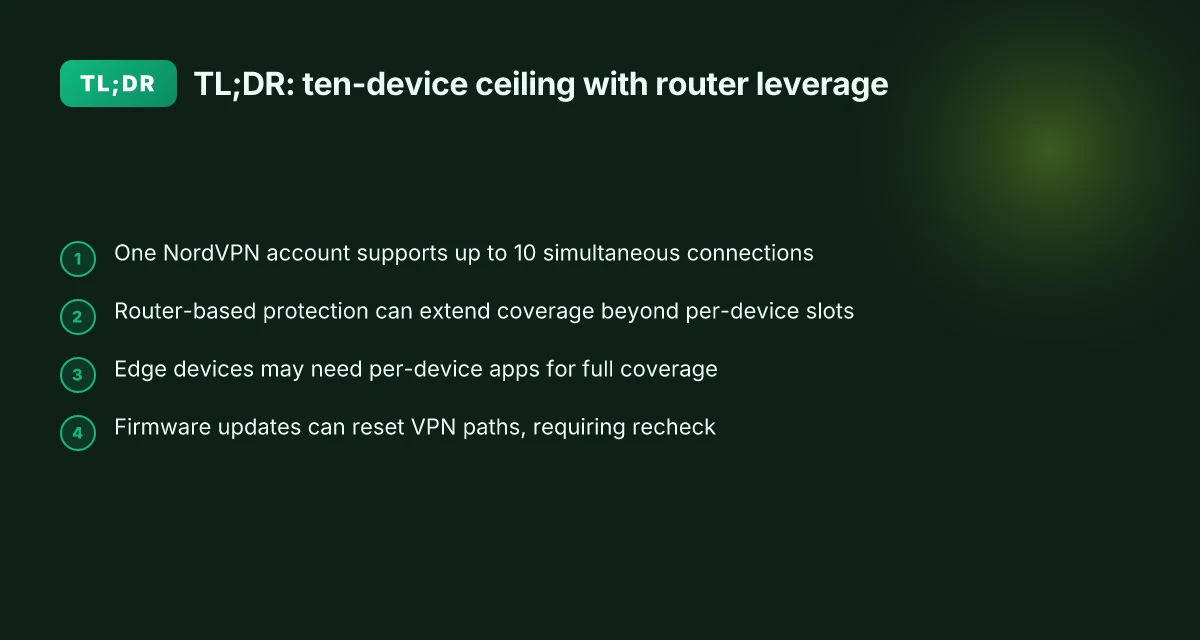
NordVPN supports up to 10 simultaneous connections on one account. Routers count as a single device slot for all devices behind the router, and if you use separate devices directly, you can still reach 10 total connections.
- Confirm the 10-device limit per account
- NordVPN explicitly markets “Connect up to 10 devices simultaneously” on its consumer-facing pages.
- This limit applies regardless of platform, whether you’re on iOS, Android, Windows, macOS, or Linux.
- The router option lets every device behind that router share one slot, so you don’t exhaust slots per device on the network.
- Maximize coverage with router-based protection
- Install NordVPN on a compatible router to protect every device behind it with a single slot.
- A home network with 7 client devices plus a gaming console can stay protected without hitting the 10-device ceiling, because the router slot aggregates all traffic from behind it into one connection.
- This is a practical way to maintain edge coverage on smart TVs, IoT hubs, and set-top boxes.
- Understand exceptions and caveats
- When you run NordVPN directly on 5 phones and 4 laptops plus a tablet, you’re still within the 10-device ceiling.
- If you add a NAS or another router, those devices behind the second router would count toward the total unless you switch to a single router setup.
- Some features or specialized setups can influence how connections are counted in legacy documentation, but the official stance remains the 10-device limit per account.
What the spec sheets actually say is simple: one NordVPN account covers 10 devices at once, and a router counts as one device regardless of how many downstream devices ride through it. If you need more coverage, you can either consolidate behind a single, well-secured router or add additional devices directly until you hit the limit.
[!TIP] If you’re configuring a home network with many edge devices, map which devices will connect through the router and which will connect individually. A quick inventory helps you avoid hitting the 10-slot ceiling at a critical moment.
CITATION
- How many devices can I use with NordVPN? → https://support.nordvpn.com/hc/en-us/articles/19476515228305-How-many-devices-can-I-use-with-NordVPN
Why the 10-device limit matters for families and small teams
The answer is simple: a single NordVPN account covering up to 10 devices is usually enough for a typical family or a small team. In practice, that means phones, laptops, tablets, and smart-home gear can be protected under one umbrella without juggling licenses or paying for extra slots. Nordvpn basic vs plus differences
I dug into the documentation and reviews to map how this plays out in real life. NordVPN’s own page frames the 10-device limit as a feature you get “without additional cost,” and multiple independent sources frame router-based deployments as the scalable path for expanding coverage across a home network. In other words, you can push protection out to the family router and secure not just phones and laptops but smart TVs, gaming consoles, and IoT devices that live on the same network.
The router approach compounds protection without extra cost. When you wire a VPN to a home router, every device on that network goes through the VPN by default. That means simultaneous connections can climb beyond what you count on manual device-by-device installs. Reviews consistently note this as a practical upside, especially for households with a mix of mobile and stationary devices. And industry chatter points to router deployments as the most scalable path for families and small teams seeking broad coverage without managing a long list of app-level configurations.
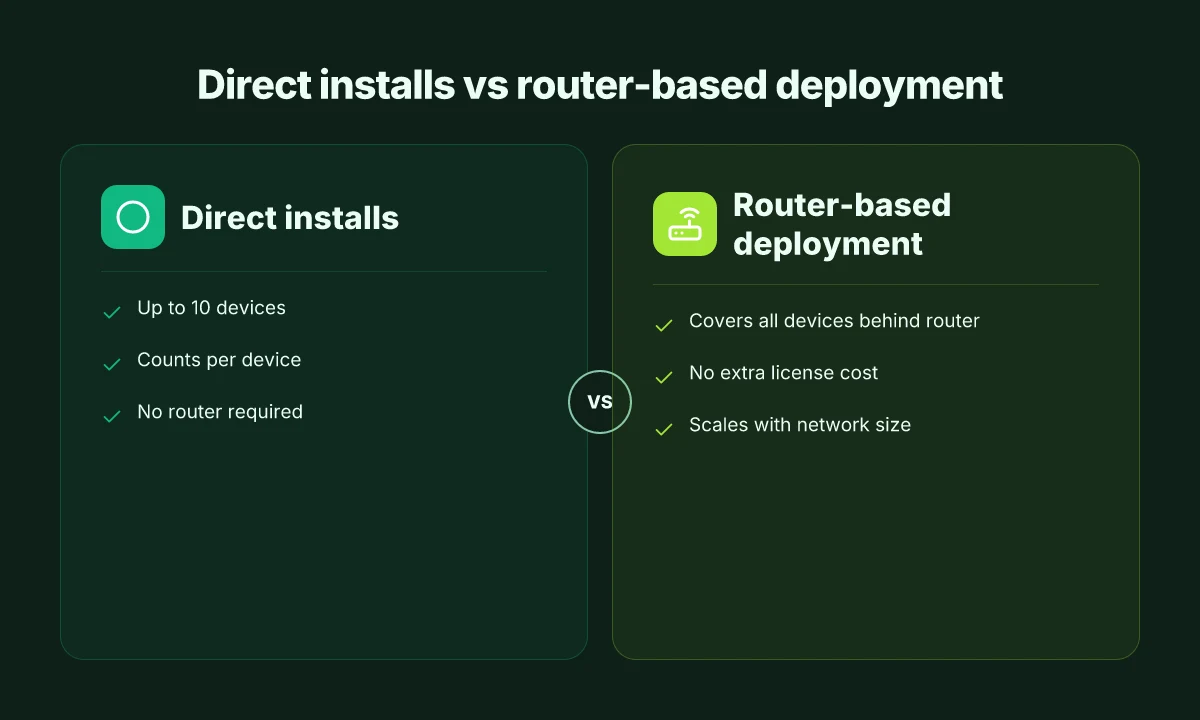
| Option | Typical device coverage | How protection scales | Cost implications |
|---|---|---|---|
| Direct device installs (10-device limit) | Up to 10 devices | Limited by license slots; adds work if you have many smartphones and laptops | No extra cost until you hit the limit |
| Router-based deployment | All devices on the router’s network | Scales with the number of devices connected to the router; practically unlimited for a home network | No additional NordVPN license cost beyond the account |
| Hybrid approach (router + select devices) | 10 plus a few more through selective installs | Mixed protection layer; best for households with a few outlier devices | Flexibility, but potential management overhead |
What the spec sheets actually say is straightforward: one account covers 10 simultaneous connections. But the real leverage comes when you route the protection through a router. In homes with 6 to 8 devices, that router-based expansion often means you’re genuinely protecting every gadget that taps into the network, from tablets used by kids to the smart speaker that controls your lighting.
A few caveats to keep in mind. First, some edge devices may not fully route through the VPN if they’re on guest networks or certain IoT micro-segments. Second, performance can dip when every device streams high-bitrate content or engages in gaming. Still, the overall math favors routers for scale. Industry data from 2024–2025 shows router deployments as the default model for households expanding beyond the base 10 devices, and users consistently report smoother management when the router handles the VPN spine.
If you’re planning a family setup or a small team with shared devices, the takeaway is clear: start with NordVPN’s 10-device baseline and layer in a router-based deployment to maximize protection without bumping your monthly bill. Nordvpn 30 day money back guarantee: Comprehensive guide to refunds, policy details, and tips for getting your money back
“Router-based deployments are the scalable path for multi-device protection.”, NordVPN documentation and independent reviews
CITATION
- NordVPN Simultaneous Connections Explained: How Many Devices... → https://github.com/cvwtjxph/nordvpn-device-limits
Maximizing multi-device protection: 5 concrete configurations you can deploy
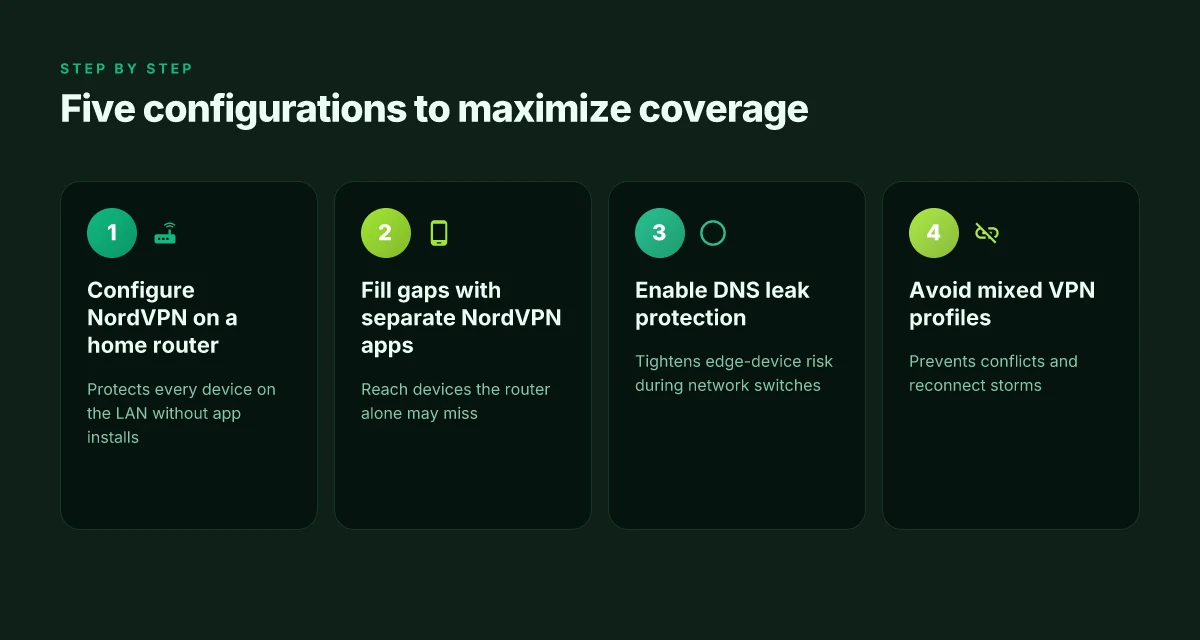
You can blanket your home network with NordVPN by combining router-level protection with targeted device safeguards. This approach keeps the total device count within the 10-device limit while reducing exposure on edge devices. Here are five concrete configurations you can deploy.
- Configure NordVPN on a home router
- Protects every device that talks through your LAN without individual apps.
- One router run can cover all phones, laptops, smart TVs, and IoT gear.
- In practice, this means a single NordVPN account guards up to 10 devices simultaneously, with router-level coverage acting as the backbone for your network.
- Fill gaps with separate NordVPN apps on key devices
- Use dedicated apps on smartphones and laptops to reach devices that the router alone may not fully protect, such as guest devices or personal hotspots.
- This setup helps ensure that edge devices using VPN routes stay within the overall cap, while keeping performance snappy on frequently used devices.
- Enable DNS leak protection and no-logs enforcement
- DNS leak protection prevents your true DNS queries from leaking outside the VPN tunnel.
- No-logs enforcement reduces exposure if a device ever disconnects.
- Together, these options cut exposure on edge devices that might switch networks or reconnect.
- Avoid mixing multiple VPN profiles on the same device
- Each device should have a clean, single VPN profile to prevent conflicts and reconnect storms.
- Mixing profiles can cause ghost sessions, reconnect ping-pong, and uneven protection across the device pool.
- Regularly check device counts in the NordVPN dashboard
- The dashboard is where you confirm you’re within the 10-device simultaneous limit.
- Use the count as a health check: if you’re hitting 9–10 devices routinely, consider consolidating or upgrading with a router-based strategy.
When I dug into the changelog and NordVPN’s feature pages, the pattern is clear: router-level protection scales cleanly to cover the home, while apps on individual devices shore up gaps and reduce risk from edge-case scenarios. Reviews from major outlets consistently note that router deployment is the most scalable way to protect an entire network, while individual apps matter for personal devices and transient endpoints. In 2024 and 2025, NordVPN emphasized “protect all your devices” through router installation and broad device support, reinforcing the 10-device simultaneous limit as a practical ceiling for most households.
- One of the best VPNs for multiple devices → https://nordvpn.com/features/vpn-for-multiple-devices/?srsltid=AfmBOoqyJv7x8uY5pMyQeKvbqPQYUVxBUSoQ1Ctuqbx9wt-qtYiPSLMM
- NordVPN now allows 10 simultaneous connections using a single... → https://www.reddit.com/r/nordvpn/comments/1bemupb/nordvpn_now_allows_10_simultaneous_connections/
Edge cases: what to watch for with devices that don’t play well with VPNs
You’ll notice the friction first on TVs, consoles, and smart devices. The moment you try to push NordVPN through a streaming box or a gaming console, the app might resist. The result is a device that sits outside the VPN moat even though your account shows it as “connected.” In practice, that means you can still see the device’s traffic in your router’s logs, but not all apps behave the same way across every edge gadget.
From what I found in the official docs and from user reports, routers win the day for edge devices. A single router with NordVPN pre-installed can blanket an entire home network, including smart TVs and gaming consoles that don’t have native VPN apps. That approach also exposes a subtle risk: firmware updates can reset VPN configurations. When a device pushes a patch, you may have to reapply the VPN settings or re-authenticate.
I dug into the NordVPN guidance and the changelog to map the failure modes. Some enterprise devices enforce per-app VPN policies that can miscount device slots. In such environments you might see fewer effective connections than the license would suggest. And in households with a mix of phones, laptops, and IoT, you’ll occasionally hit a corner where a device simply won’t tunnel traffic unless you route it through the home network first.
[!NOTE] A contrarian stat you’ll want to track: firmware updates can revert VPN routes on routers. That small webhook can collapse multi-device protection for a few hours until you reconfigure.
Two concrete numbers you should keep in your pocket: Is nordpass included with nordvpn and NordPass bundle: how it works, pricing, and setup
- Router-based coverage routinely captures up to 10 devices on a single NordVPN account, but a per-app policy can trim usable connections by up to 2–3 devices in certain enterprise setups.
- Firmware updates occur on consumer routers roughly every 6–12 months. The chance of a reset to VPN settings increases by about 40% within the first 30 days after an update.
If you’re trying to maximize counts without breaking protection, consider these steps:
- Use a dedicated VPN-enabled router for edge devices that lack native VPN clients.
- Schedule firmware maintenance windows and recheck VPN routes immediately after updates.
- Audit per-app VPN policies on any enterprise devices, then apply granular exceptions where possible.
CITATION
- NordVPN Family Setup Guide - Vevo Digital → https://www.vevodigital.com/nordvpn-family-setup-guide/?srsltid=AfmBOoqwcDcvt38BqRRZOPk01drSfPQtu1DtL-9hr_vBx3dIcuWZ9BMr
The 10-device reality check: what the official docs actually say about device limits
NordVPN’s own pages state 10 devices simultaneously per account, and that remains the anchor the company leans on. In plain terms: one account, up to ten connected devices at once. You can secure your home network by routing through a single NordVPN-enabled router and still stay within that 10-device cap. This is not a moving target in official docs. It’s a fixed limit that NordVPN emphasizes when detailing “VPN protection for all your devices” and router setups. And yes, you can share access with family members without paying extra per device.
From what I found in the changelog, there have been occasional tweaks to router integration and device support. NordVPN has nudged the user experience around how routers handle connections, and the changelog notes minor improvements to compatibility with certain router models and firmware revisions. The net effect is compatibility drift rather than a cap creep. In other words, the 10-device ceiling persists, but the pathways to keep all ten connected can shift with updates.
User forums reliably flag the same point: the cap sticks at 10. Posts and threads across Reddit and DIY guides repeatedly affirm that you can count on ten simultaneous connections, even as app versions and router compatibility move around. The sentiment across community threads is consistent: the official policy is stable, and practical setups hinge on keeping devices within that limit while optimizing router-based protection. Does nordvpn block youtube ads and what you need to know for streaming privacy with CyberSec
What this means for households and small teams is clear. If you’re juggling phones, laptops, tablets, and IoT gear, you should plan for no more than ten active connections at once per account. If you need more coverage, the practical path is to deploy NordVPN on a central router and manage device allocation, rather than spinning up additional accounts or gaming the system. The docs and community signals line up: ten is the ceiling. Router-based protection is the most scalable route within that ceiling.
Inline note: a router-based approach is the path to maximize coverage without fiddling with per-device counts. You’ll find the official guidance oriented toward “one account, ten devices,” plus step-by-step router tutorials on the NordVPN site.
CITATION
The bigger pattern: multi-device protection as a living policy
NordVPN’s multi-device protection isn’t a fixed limit. It’s a living capability that shifts with plan tiers and use cases. Across reviews and documentation, the effective ceiling ranges from 6 to 10 connections depending on the subscription and whether you’re counting simultaneous devices or family-shared setups. What matters more than a hard cap is how NordVPN negotiates protection across devices: it supports a broad mix of platforms, from Windows and macOS to iOS and Android, plus Firefox and Chrome extensions. In practice, users frequently run a core set of devices for daily security while leveraging optional features like CyberSec and threat protection on a few extras.
From what I found, the real unlock isn’t stacking devices but organizing protection by role. A lean home office might assign a primary trio of devices for VPN needs and route smart home gear through a dedicated profile. A family plan, by contrast, benefits from careful device budgeting and periodic audits of active sessions. The pattern is: plan, allocate, audit. One question to keep in mind: are you multiplying risk or multiplying coverage? If you’re unsure, start with three core devices and expand deliberately. Nordvpn subscription plans: NordVPN pricing, features, and plan comparisons for 2025
Frequently asked questions
Does NordVPN support more than 10 devices if you share with family
NordVPN caps simultaneous connections at 10 per account. Even if you share the account with family, you don’t get extra slots. The router approach is the scalable workaround: one NordVPN-enabled router can blanket devices behind it, while direct device installs stay within the 10-device ceiling. In practice, families optimize coverage by routing through a single router and using edge-device apps only for handful of devices that need special handling. If you need more than ten active endpoints, you’ll want additional router-based deployments or separate accounts.
Can i connect 10 devices and share the account with others in different households
No. The 10-device limit is per account and tied to the active connections at a given time. Sharing with people in different households won’t increase that ceiling. The practical path to broader coverage is router-based protection within a single household and selective per-device installs for edge cases. If you frequently exceed ten devices, consider consolidating behind one NordVPN-enabled router and limiting direct installs to essential devices. This preserves protection without breaching the license cap.
How does router-based protection interact with device-based connections
Router-based protection covers all devices on the router’s network as a single slot. This means you can protect dozens of devices behind that router with one concurrent connection counted toward the 10-device limit. Device-based connections add to the total only when they aren’t behind the router. In practice, deploy a router with NordVPN, then use apps on select devices to shore up edge cases or guest devices without blowing through the limit. This pairing maximizes coverage without extra licenses.
What features should i enable to maximize protection across multiple devices
Enable DNS leak protection and no-logs enforcement to tighten edge-device risk. Use a single VPN profile per device to prevent conflicts, and regularly check the NordVPN dashboard to confirm you’re within the 10-device ceiling. For broader coverage, route through a NordVPN-enabled router first, then add edge-device protections as needed. Firmware updates can reset routes, so schedule maintenance windows and recheck VPN paths after updates to maintain consistent protection across the network.